Candidates
The Candidates section is your organisation's talent pool — all individuals who have been added to FrontLine, whether through an application, manual entry, or import.
Viewing candidates
Navigate to Recruiting → Candidates to see your full talent pool.
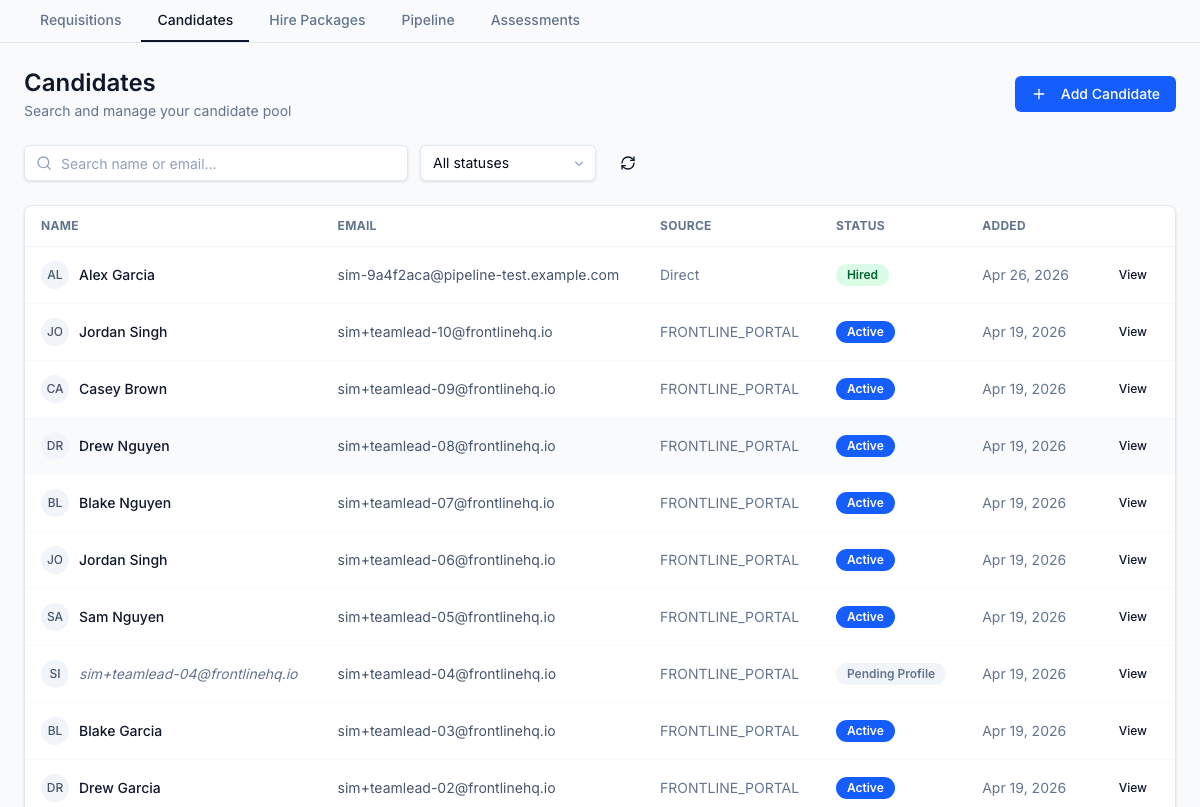
Each row shows:
- Name and email address
- Source — how the candidate entered the system (portal application, manual, referral, etc.)
- Status — current pool status
- Added — date added to the system
Filtering candidates
Use the Search box to filter by name or email (results update as you type).
Use the Status dropdown to filter by:
| Status | Meaning |
|---|---|
| Active | Available and being considered for positions |
| Inactive | Not currently being considered |
| Do Not Contact | Opted out or blocked from outreach |
| Hired | Successfully placed |
| Archived | Retained for record-keeping |
Adding a candidate manually
- Click Add Candidate.
- Enter the candidate's name, email, and source.
- Save. The candidate is added to the pool with Active status.
From the candidate's profile, you can attach them to requisitions, add notes, upload documents, and track their full application history.
Candidate profile
Click any candidate row to open their profile, which includes:
- Contact information
- All applications across all requisitions
- Documents (resume, cover letter, supporting files)
- Activity timeline