Hire Package Pipeline
The Hire Package Pipeline gives recruiters and HR administrators a single view of all candidates who are currently working through a hire package — tracking their progress across both steps and flagging anyone who is overdue.
Viewing the pipeline
Navigate to Recruiting → Hire Package Pipeline.
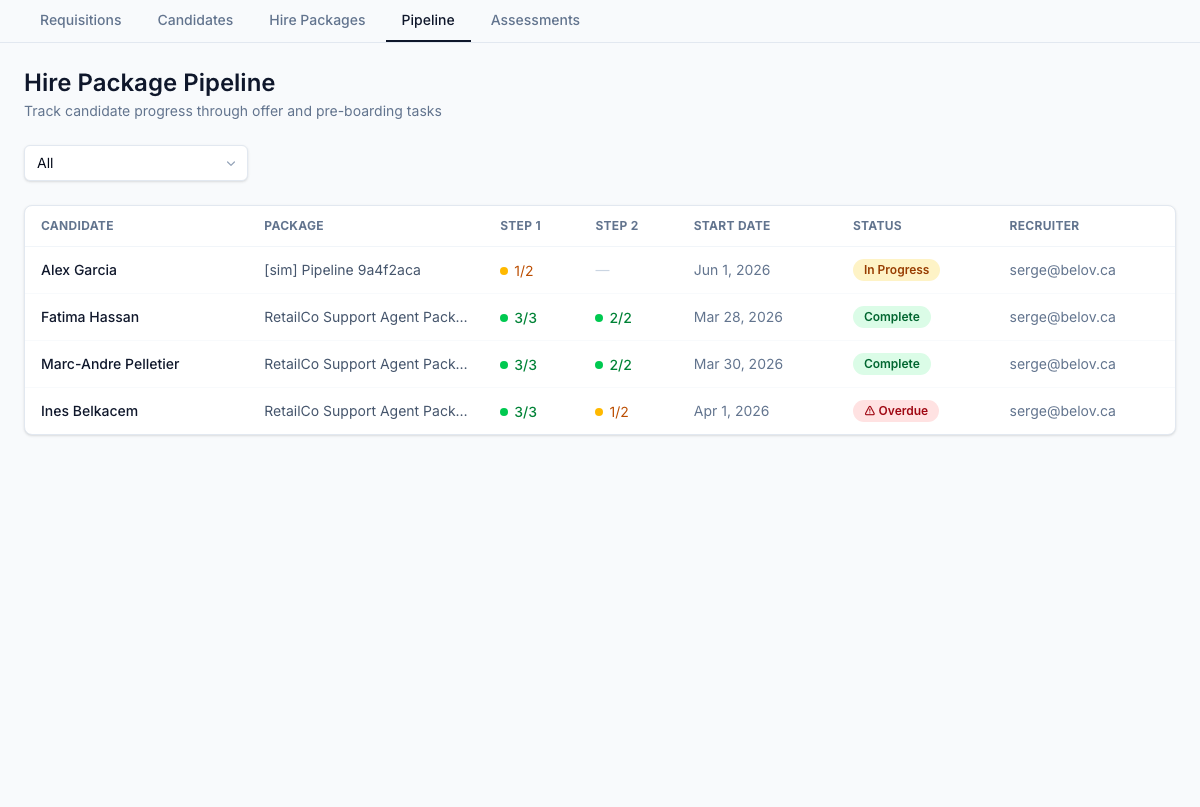
Each row shows:
| Column | Description |
|---|---|
| Candidate | Name of the candidate |
| Package | The hire package template assigned |
| Step 1 | Progress on Review & Accept Offer (items completed / total) |
| Step 2 | Progress on Pre-boarding Paperwork (items completed / total) |
| Start Date | Candidate's expected start date |
| Status | Current package state |
| Recruiter | Recruiter assigned to the application |
Status meanings
| Status | Description |
|---|---|
| In Progress | Package is active and candidate is working through it |
| Step 1 Complete | Candidate has completed offer acceptance; Step 2 in progress |
| Pre-boarding Complete | Both steps done; candidate is cleared to start |
| Overdue | One or more items are past due relative to start date |
Filtering
Use the Status filter to focus on a specific group — for example, filtering to Overdue lets you quickly identify candidates who need a follow-up.
Drilling into a candidate
Click any row to open the candidate's application detail, where you can see the full hire package breakdown, individual item statuses, and any waivers that have been applied.
Waivers
If a required item cannot be completed before the start date (for example, a document that arrives late), a recruiter with appropriate permissions can apply a waiver to that item. Waivers are logged with the reason and the user who approved them.