Onboarding
The Onboarding module provides a structured, template-driven process for bringing new hires from offer acceptance to being fully productive on day one.
When a candidate is hired, an onboarding workflow is created for them automatically based on the template assigned to their role or client. Each workflow is a personalised checklist of tasks — policy reviews, system access requests, equipment setup, training sessions — that must be completed by a combination of the new hire, their manager, and HR.
Key concepts
Onboarding Template — a master checklist that defines what tasks need to happen for a given role, client, or LOB. Templates are created and managed by HR administrators.
Onboarding Workflow — a live instance of a template, specific to one employee. It tracks which tasks are done, by whom, and by when.
Task — a single action item in a workflow. Each task has an owner (HR, Manager, or Employee), a due date relative to the start date, and a completion state.
The onboarding view
Navigate to Onboarding in the sidebar to see all active and completed workflows.
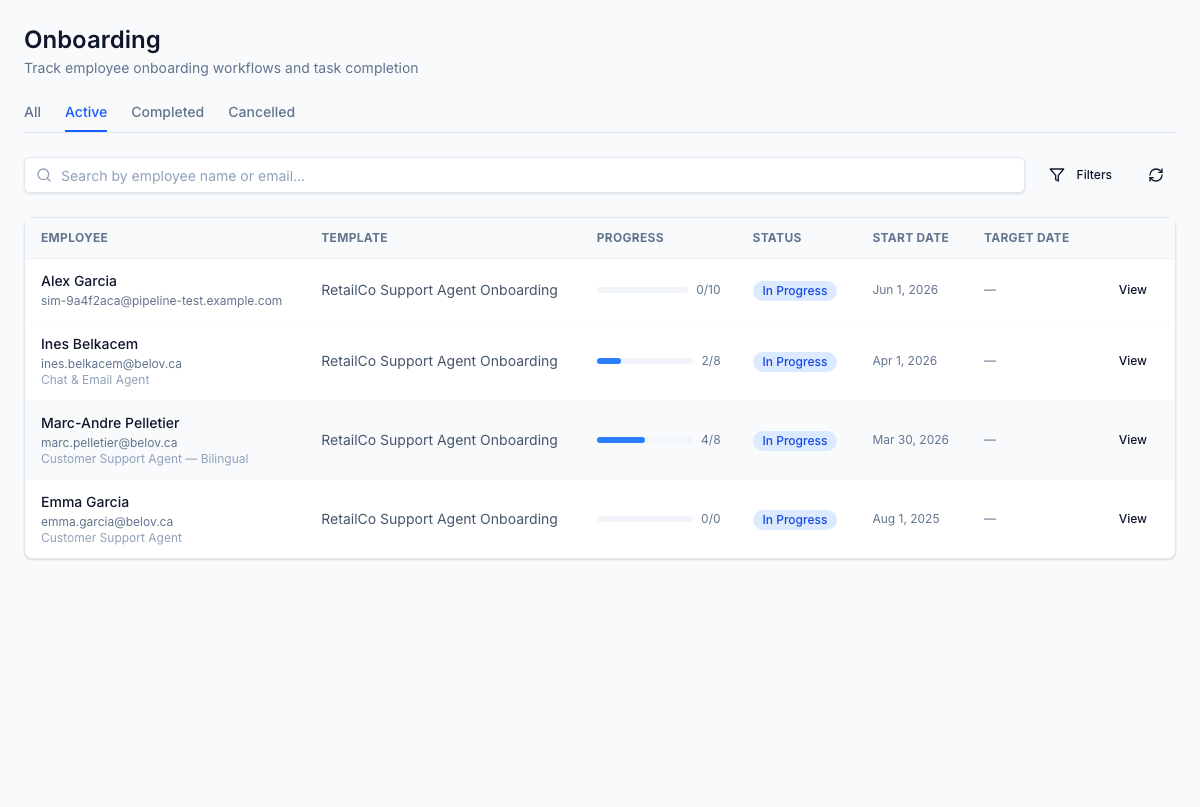
Use the tabs to filter by:
- All — every workflow regardless of status
- Active — employees currently going through onboarding
- Completed — successfully finished workflows
Each row shows:
- Employee name, email, and job title
- Template used
- Task completion progress (done / total with a progress bar)
- Current status
- Start date and target completion date